
Do you use Gmail? How to Make Sure You Don’t Miss Our Emails

Some Gmail users tell us that they miss our event ticket notification emails, because Gmail sends it to their Promotions folder.
Here’s a guide to help you make sure emails from us always land in your Primary inbox, so you don’t miss out on tickets to our events.
METHOD 1: Create a Filter (Most Reliable)
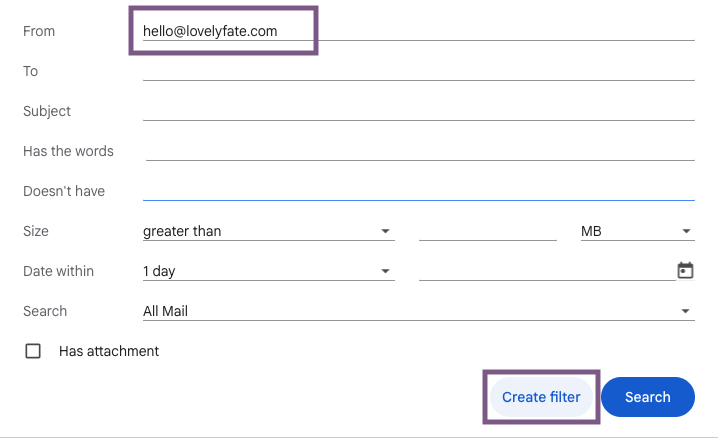
In Gmail, click the search bar dropdown icon (right side).
In the “From” field, enter: hello@lovelyfate.com
Click “Create filter”
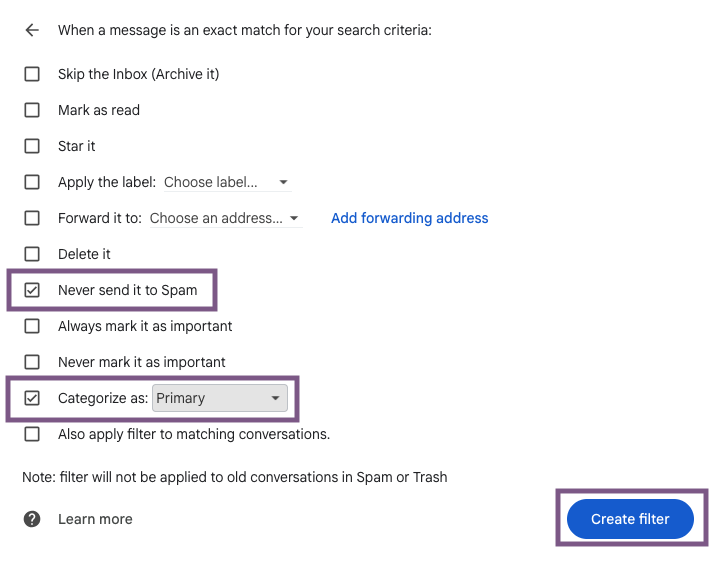
Check:
-Never send it to Spam
-Categorize as: Primary
Click “Create filter” to save
METHOD 2: Add to Contacts (Recommended)
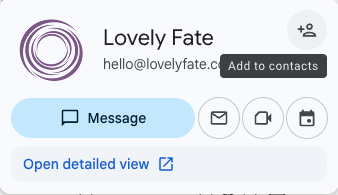
Open an email from hello@lovelyfate.com
Hover over the sender name
Click “Add to Contacts”. This tells Gmail that you trust emails from us.
Pro Tip
If you ever don’t see an email from us, check your Promotions or Spam folder and move it to Primary — Gmail will learn your preference.